A significant part of pre-reset Longhorn’s new UI sits on the .NET Framework. Sidebar, preview pane, Avalon shell views, tiles, a handful of control panels — managed code shows up all over the place. That said, it is easy to overstate the story. The whole shell was not rewritten in C#, and explorer.exe itself is still good old native Win32.
What Longhorn actually did was plug managed components into Explorer over COM, much like XP already did with native shell extensions — only now those extensions can host the CLR. A lot of that shell work was written in Managed C++, not C#. If you want the deep dive on that architecture, see Managed C++, and the Longhorn Shell.
This article walks through how the Framework works under the hood, then how Longhorn used it between about 2002 and the 2004 reset.
From source to assembly
When you write a .NET program and compile it, you usually do not get native machine code. The compilers turn your high-level managed source into an intermediate form: Common Intermediate Language (CIL), also known as MSIL or simply IL. Older texts — and Java people — often call this “bytecode”. Either way, the idea is the same: something lower-level than source, easier for a runtime to verify and transform, and not tied to one language.
Platform independence
Compile straight to native code and your binary is stuck on one CPU and OS ABI. Compile to CIL and the last step — turning IL into real machine instructions — can happen on the machine that actually runs the app. In theory any CLI-compatible host can run the assembly.
In the Longhorn years that was mostly theory for real products. The commercial .NET Framework targeted Windows. Shared Source CLI (Rotor) and early Mono were out there, but Longhorn shipped Microsoft’s Windows CLR and nothing else.
Language independence
Because CIL is language-neutral, assemblies written in different .NET languages can call each other. Not every language feature maps cleanly across compilers, so Microsoft defined the Common Language Specification (CLS) — a recommended subset for APIs that need to play nicely across languages. CLS compliance is marked on types when you want it; it is not mandatory.
To show how far language independence goes, here is a tiny console “hello world” written once in Visual Basic and once in C#. The IL for the functional body was identical in both cases:
{
  .entrypoint
  IL_0000: nop
  IL_0001: ldstr "hello world!"
  IL_0006: call void [mscorlib]System.Console::WriteLine(string)
  IL_000b: nop
  IL_000c: ret
}
Intermediate form in detail
A .NET assembly is really two things glued together: metadata and managed code. Metadata describes the structural bits — classes, members, attributes, how modules relate. Managed code holds the actual methods as MSIL/CIL. That intermediate language is the lowest-level program representation in the Common Language Infrastructure (CLI).
The CLR
Somebody has to run all of this. That somebody is the Common Language Runtime (CLR). It verifies types, handles exceptions, and runs garbage collection — finding objects nobody uses anymore and freeing them.
Two subsystems turn the abstract assembly into something that actually executes:
- Loader — reads the metadata and builds in-memory layouts for classes and members. It only loads a type when something first references it.
- Just-in-time (JIT) compiler — takes CIL methods and compiles them to native machine code the first time they are called, then keeps the result around while memory allows.
Under normal JIT execution the CPU never runs CIL directly; it runs the native code the JIT produced. There is also NGEN (Native Image Generator), which can pre-compile assemblies to disk so cold starts hurt less. That matters more than you might think when shell UI is managed and keeps starting up.
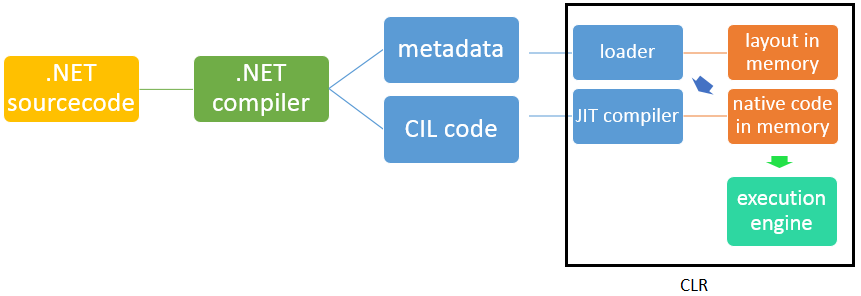
.NET inside Longhorn
Not a managed rewrite of Explorer
You will often hear that “the Longhorn shell is all C#” or “all managed.” Neither is really true.
- The host process (
explorer.exe) is still native. - The new UI arrives as COM-loadable managed modules. If those fail to load, Explorer falls back toward XP-style views — you can even force that; see Hacking Avalon #1: Disable it.
- Much of the shell-side managed work was Managed C++ (mixed-mode, easy native interop). C# showed up in samples and in some features (Media Center had a managed heritage), but it was not the whole story.
Again, Managed C++ is the place for the details.
Versions and layout on disk
Early Milestone builds such as 3683 sit on .NET Framework 1.x plus a pre-release Avalon stack. Base assemblies live under %WINDIR%\Microsoft.NET\. Avalon tools and runtime bits often sit under %WINDIR%\Microsoft.NET\Avalon\, including the early Avalon Compiler ac.
A full 64-bit CLR arrived late. Until then, x64 Longhorn builds looked oddly empty: sidebar, preview pane, Avalon shell chrome all needed a Framework that did not exist for that architecture yet. Build 4083 got a base Framework on x64, but Avalon was still incomplete there. See 64-bit Windows.
C++/CLI only showed up after the reset, shipping with .NET 2.0 and Visual Studio 2005. It was Microsoft’s second attempt at C++ on the CLR, and was very likely shaped by how painful Managed C++ had been in pre-reset Longhorn.
WinFX
Microsoft branded the next wave of managed OS APIs as WinFX. In the Longhorn period the two pillars that matter most for what you actually see in builds are Avalon and WinFS.
Avalon is the presentation stack — what later became WPF. XAML and BAML, shell views, tiles, a lot of the shiny UI surfaces. Drawing eventually goes through the native Media Integration Layer (MIL) / compositor: managed UI on top, unmanaged composition underneath. More on that in Desktop compositing. For Avalon hands-on, there is a short series: disable it, port it to XP, and compile XAML.
WinFS is the storage and metadata story — a SQL-backed store for rich file properties and virtual folders. It shows up in builds, eats RAM while indexing, and never really finished. It is still a big part of why people talk about managed code and Longhorn in the same breath.
Other WinFX pieces existed on the roadmap (Indigo for communications is the usual example), but they barely show up in the day-to-day shell experience compared with Avalon and WinFS.
Cost and the reset
The Framework was still young when Longhorn put so much UI on it. That bet is one of the reasons the late-2004 reset happened.
JIT cold starts, GC pauses, and memory pressure hurt when the code in question is shell-critical. Managed C++’s overloaded new and mixed ownership made leaks easier than anyone wanted. And as already noted, missing 64-bit Framework support left the x64 client looking thin for a long time.
After the reset, new system code was pushed hard toward native C++. Robert Scoble and others described what amounted to a ban on new .NET for core OS work; Media Center is often cited as an exception. Avalon and WinFS ideas did not vanish forever — presentation work later returned as WPF on a healthier base — but the pre-reset “stuff the shell full of managed code” approach was over. Full story: The reset.
.NET and Java
It is hard not to notice how much .NET and Java have in common: intermediate code, garbage collection, a virtual machine in the middle. Java came first, so if either is a rip-off it is not Java. Microsoft’s earlier Microsoft Java VM (MSJVM) led to a Sun lawsuit in 1997 and a 2001 settlement that wound MSJVM support down. Microsoft then pushed “JUMP to .NET” to pull Java developers over. In the Longhorn years the Framework was still Windows-first; Java kept a clearer cross-platform story.